
TL;DR

Get everyday helpers delivered free with Prime
- Fast, free delivery on millions of items
- Prime Video, Amazon Music and more included
- Member-only deals all year
Medical alert systems let a person call for help after a fall, sudden illness, or other emergency by pressing a wearable button that connects to a response center, caregiver, or emergency service. Choose between home based coverage and mobile coverage by considering where the person spends time, then check fall detection limits, how responders handle missed answers, device comfort, privacy, and the full cost.
A help button only works if it’s close enough to reach and comfortable enough to wear. That small detail can matter when a senior slips on a wet bathroom floor, feels faint in the garden, or needs help but can’t get to a phone.
Medical alert systems, sometimes called personal emergency response systems, connect a wearable button to a base unit, mobile device, response center, caregiver, or emergency service. This guide explains how those connections work, what in-home and mobile coverage each offer, and why fall detection, response procedures, and everyday usability deserve as much attention as the advertised features.
You’ll also get a practical way to compare costs and test a device before relying on it. For example, a system that works well in the living room may not help if it loses connection in the shower or the yard. Match the system to the person’s routines, home, and comfort with technology, and ask a qualified professional about individual medical decisions.
Choose in-home or mobile coverage based on where the senior spends time, then check connection in the places they use most.
Treat automatic fall detection as backup; keep an easy-to-press wearable button in the routine.
Test comfort, water resistance, operator communication, and charging before relying on a device.
Compare the full cost, contract, cancellation terms, and missed-response procedure—not just the monthly fee.
Ask what location data a mobile service collects and who can access it.
How a Medical Alert System Gets Help to You
A medical alert system connects a person to help when they press a wearable button or, on some models, when a device detects a possible fall. The signal travels through a home base, mobile device, or paired phone to a monitoring center, caregiver, or emergency service. The exact route depends on the plan and device, so ask who answers and what happens next.
Think of the button as a small doorbell with a response plan behind it. In one home, pressing it might open a two-way conversation with a trained operator through a speaker in the base unit. In another, the device may call family members first. If someone presses the button after feeling chest discomfort, they need to know whether an operator can hear them, whether the operator will call emergency services, and whether a caregiver also gets notified.
Ask providers to walk you through a real call, including what happens if the wearer can’t speak or doesn’t answer. Some services may use the person’s saved profile and contact list to decide how to respond, but policies vary. Confirm that the system is monitored around the clock if you expect help at any hour, and learn how it handles accidental button presses.
Before relying on the device, practice a test call according to the provider’s instructions. Have the senior press the button while seated at home, then check that the operator can understand them from their usual chair or bedroom. A calm practice call can make the real one feel less like an unfamiliar alarm blaring into a quiet room.
Popular right now

Shark ZU102 Rotator Pet Upright Vacuum with PowerFins HairPro & Odor Neutralizer Technology, Charcoal

Dyson V8 Cyclone Cordless Vacuum

Ninja Crispi Microwave and Air Fryer with FusionCrisp, Silver, MW101
As an affiliate, we earn on qualifying purchases.
Choose Home or Mobile Coverage Based on Daily Routines
In-home systems connect through a home base and work within its range, while mobile systems use cellular service and often include location tools for use outside the home. A home setup can suit someone who spends most of the day indoors; a mobile device can make more sense for someone who walks the dog, visits a nearby shop, or gardens beyond the base unit’s reach.
Picture two neighbors. Marta lives in a compact apartment, rarely goes out alone, and keeps a phone on her kitchen table. A home base with a wearable button may cover most of her routine. Jim takes daily walks and sometimes visits the community garden by himself; a mobile system may offer a way to call for help away from home, provided the local cellular network supports it.
Neither option covers every situation automatically. A home device may lose connection at the edge of its range, while a mobile device may depend on cellular coverage, battery charge, and location signals. A phone or smartwatch can add convenience for someone who already uses one comfortably, but a purpose-built device may offer a simpler button and battery routine. Check current provider details and test coverage in the places the senior actually goes.
| Feature | In-home system | Mobile system |
|---|---|---|
| Typical use | At home, within base range | At home and away, where service works |
| Connection | Home base; requirements vary | Usually cellular, sometimes paired with a phone |
| Practical check | Test bedrooms, bathrooms, and outdoor areas | Check network coverage, battery, and location sharing |
For a senior who splits time between home and errands, ask whether one plan covers both settings or whether two devices are needed. That answer can change both the monthly cost and the charging routine.
Treat Fall Detection as Backup, Not a Promise
Automatic fall detection can try to contact help when a device senses a fall and the wearer cannot press the button, but it can miss an event or raise a false alarm. The help button remains important because fall detection is an imperfect backup rather than a guarantee that every emergency will be recognized.
For instance, a senior might stumble beside a sofa, sit down hard, and feel too shaken to reach the pendant. Automatic detection may help in that moment if the device recognizes what happened and has power and connectivity. But a slow slide onto a chair may not register, or a dropped device could trigger an alert. The wearer or caregiver still needs to understand what the system can and cannot do.
Ask the provider how its detection feature works, what triggers an alert, whether the wearer can cancel a false alarm, and whether the monitoring center speaks through the device. Also check any added cost and whether the feature works in the locations where a fall is most likely, such as the bathroom or garden. A feature listed on a product page is not proof that it will detect every fall or locate someone precisely.
Think of fall detection as a second set of eyes, not a safety net that catches every fall. A wearable button that the person will actually keep on them still matters.
Consider the routine, too. If someone often removes a pendant because it catches on a sweater, a wrist device might be more comfortable. If a device needs daily charging and the senior forgets, a weekly charging habit or a different model may fit better. The best backup is one that stays powered and gets worn.
Check Comfort and Ease of Use Before You Compare Extras
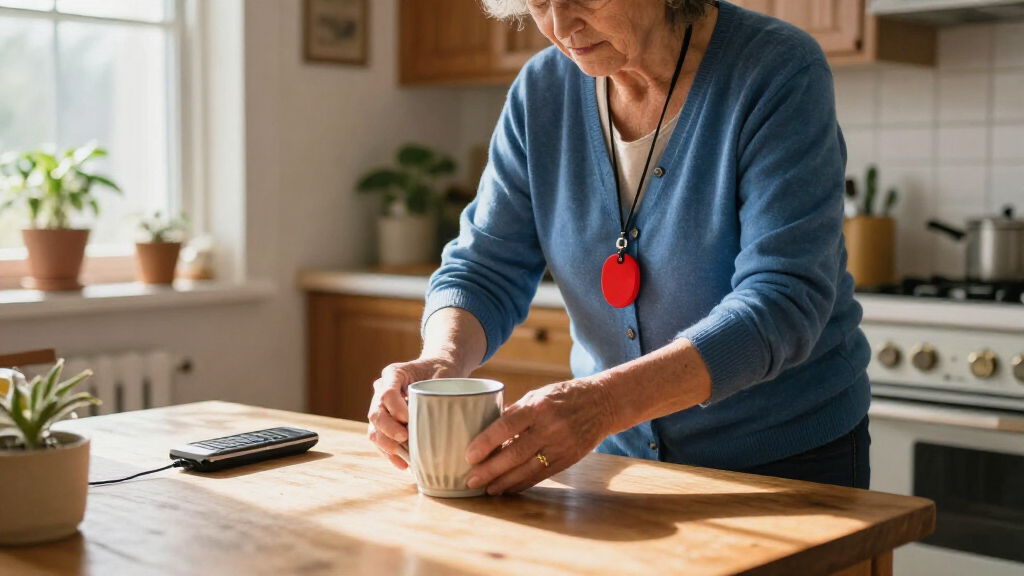
A medical alert device is useful only if the senior can wear and activate it when needed. Button size, weight, water resistance, battery life, charging steps, hearing, vision, memory, and hand dexterity all shape whether a device fits everyday life. A plain, comfortable button may serve someone better than a feature-packed gadget they leave in a drawer.
Imagine a person with arthritis who can’t reliably pinch a tiny switch, or someone with hearing loss who struggles to follow a fast spoken prompt. Ask whether the control is large enough to press, whether the operator can speak clearly, and what happens if the wearer can’t respond. If vision is limited, check whether the button is easy to find by touch. Family members can help test the setup, but the senior should have a chance to try it themselves.
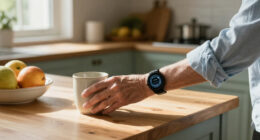
Water matters because bathrooms have hard surfaces and people may leave wearable devices on the sink before showering. Check the specific device’s water resistance and whether it can be worn in the shower or bath; don’t assume every model can. For example, a person who wears a pendant all day but takes it off to wash may be unprotected during one of the times they most want a call button nearby.
- Try it on: Check weight, fit, and comfort with ordinary clothes.
- Practice the button: Ask the senior to find and press it without coaching.
- Test communication: Confirm that they can hear and understand the operator.
- Set a charging routine: Tie charging to a familiar habit, such as breakfast.
- Test key locations: Follow provider instructions to check bedrooms, bathrooms, and outdoor spots.
One practical example: if a senior already takes medication with breakfast, charge a mobile device at that same table and place a note beside the pill organizer. A simple cue can make charging easier to remember.
Compare the Full Cost and Response Plan Before Buying
The real cost of a medical alert system can include equipment, monthly monitoring, activation, shipping, automatic fall detection, and cancellation fees. Ask whether the equipment is rented or purchased, whether a long-term contract applies, and what happens if the senior moves or no longer needs service. The monthly price alone may leave out costs that affect the family’s decision.
For example, two plans may advertise similar buttons, but one may charge extra for fall detection or mobile coverage, while another includes equipment but requires a longer commitment. Ask each provider for the full cost over the period you expect to use the service, including setup and cancellation. Get the answer in writing so you can compare like with like.
Then trace the response path. Does the button call a monitoring center or family directly? Are operators available all day and night? If the wearer does not answer, will the operator contact the emergency contacts, request emergency services, or follow another procedure? Check how many contacts you can list and who receives location information if the device supports it.
Privacy deserves a direct question, especially for mobile devices. Ask what location data the service collects, who can see it, when it is shared, and how the provider stores it. A caregiver app can help a daughter see whether her father has arrived home after a walk, but the family should agree on what tracking feels useful and respectful to him.
Payment options can depend on the person’s location, coverage, and program eligibility. Don’t assume a plan will be paid for by Medicare, Medicaid, or private insurance; ask the provider and the relevant plan administrator what applies to your specific case. A clear quote and a tested response plan make the choice easier to explain to relatives who are sharing the cost.
Make the Device Part of a Real Safety Routine
A medical alert system works best as one part of a practical safety routine, not as a substitute for other support. The wearer needs to know where the button is, how to call for help, and what the service does if a fall or other emergency leaves them unable to speak. Caregivers should also know who will answer alerts and how to keep the device charged.
Take Elena, who lives alone and meets a neighbor for a morning walk. Her family helps her test the device at home, confirms that mobile coverage works along her usual route, and agrees that the monitoring center should call her daughter if Elena doesn’t answer. They also choose a charging time and leave the provider’s contact instructions near the base unit. That routine gives everyone a shared plan without asking the family to watch her every move.
Start small. Have the senior wear the device during a normal day, press the test button as instructed, and see whether they can complete the steps without someone standing over them. If the device feels awkward, the operator sounds hard to hear, or the charge routine gets missed, address that before depending on it. A small change—switching from a pendant to a wrist button, for example—can make the device more likely to stay in use.
- Write down the response route: Note who answers, who gets notified, and what happens if there is no response.
- Keep contact details current: Update family numbers after a move or phone change.
- Practice periodically: Follow the provider’s testing instructions so the routine stays familiar.
- Revisit the fit: Recheck coverage, comfort, and charging after health or living changes.
A device can help let a person call for help after a fall or other emergency, but it cannot guarantee that an alert gets through or that a particular response will happen. For medical decisions and individual safety needs, consult a qualified professional who knows the person’s situation.
Frequently Asked Questions
Does a medical alert system call 911 or a monitoring center?
It depends on the plan. Some systems connect first to a monitoring center, whose operator can speak with the wearer and follow the provider’s response procedure; others may contact caregivers directly or use another route. Ask who answers the button and what they do if the wearer cannot respond.
Can a medical alert system work outside the home?
Mobile systems can work away from home where their cellular connection and location tools function, while a home base system usually covers only its operating range. Check coverage along the person’s usual routes and ask what happens if the signal drops or the battery runs low.
How reliable is automatic fall detection?
Fall detection can try to call for help without a button press, but it can miss a fall or trigger a false alarm. Treat it as a backup and keep a wearable help button available. Ask the provider how alerts are handled and whether the feature adds a fee.
Can the device be worn in the shower?
Some devices are designed to be water resistant, but capabilities vary by model. Check the product’s specific instructions before wearing it in a shower or bath. If the wearer usually removes it to wash, choose a safe place nearby and consider whether that routine leaves them without a way to call for help.
Ask the provider whether the wearer can cancel an accidental alert and how an operator responds if nobody answers. Some services may use emergency contacts or follow a no-response procedure, but the details vary. Practice the call process so the senior and family know what to expect.
How much do medical alert systems cost, and will insurance pay?
Costs vary and may include equipment, monitoring, activation, shipping, fall detection, and cancellation fees. Request the full price and contract terms in writing. Coverage or assistance depends on the person’s specific plan and eligibility, so verify with the provider and plan administrator rather than assuming payment.
Conclusion
Choose the system around the person’s real day: where they go, what they can comfortably wear, and how they want help to reach them. Test the button, connection, and response plan before trusting the setup.
A good device should feel less like a gadget and more like a familiar key on a bright hook—easy to find when the moment calls for it.