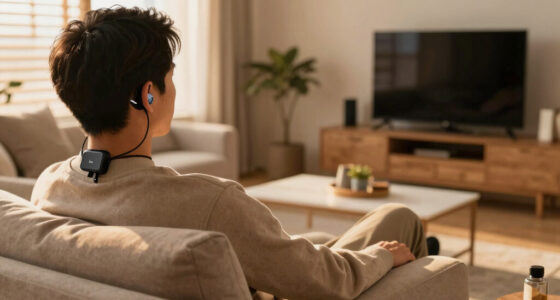

This checklist is for people who are deaf or hard of hearing, and for anyone helping them explore communication and alerting aids. It covers everyday needs such as following conversations, using the telephone, hearing TV audio, and noticing alarms or visitors, with practical needs guiding each slot.

Get everyday helpers delivered free with Prime
- Fast, free delivery on millions of items
- Prime Video, Amazon Music and more included
- Member-only deals all year
The sections are organized by the job each aid can do. Some slots name a specific pick; others offer selection advice without recommending a product. That distinction helps you compare options while keeping the focus on your communication needs.
Start with the situations that matter most in your daily routine, then use the look-for points to build a shortlist. Check compatibility with your phone, television, or other equipment where relevant, and consider how the device will fit into your space and habits. Choose one need at a time so the checklist stays manageable.
Portable Speech-to-Text Device
A portable speech-to-text device can be useful when you need spoken conversation displayed as text while away from a computer or fixed setup. Think first about where you expect to use it: a quiet one-to-one conversation, a group setting, or a conversation on the go. The setting shapes what to prioritize, especially readability and portability.
Because this slot has no named product, compare devices based on how their captions appear and how easily you can position the screen for yourself and others. A common mistake is to focus on the idea of transcription without checking whether the display is comfortable to read at the distance and angle you expect. Consider screen size, text controls, battery or power arrangements, and whether the device works with the language and equipment you use. If you plan to carry it, check its size and how it will be stored or held. Test it in a realistic setting before relying on it for important conversations.
What to look for:
- A display that is comfortable to read at your usual viewing distance
- Text size and display controls that suit your vision
- A form factor that is practical to carry and position
- Power or charging arrangements suited to your routine
- Compatibility with the languages and equipment you use
Captioned Telephone
A captioned telephone can support calls by displaying the other caller’s spoken words as text. The listed pick is the Ultratec Minicom IV TTY. Before choosing it, clarify the communication task you need to handle: captioning spoken calls, text-based communication, or another telephone setup. The product name alone does not establish which features it provides, so verify the device’s functions and how they match your needs.
A common buying mistake is to assume that devices in the telephone-aid category work the same way or connect to the same services. Check connection requirements, compatibility with your telephone line or other equipment, and whether setup depends on a service or accessory. Consider who will use the device, where it will sit, and whether the screen or controls are comfortable to access. If more than one person will use it, include their communication preferences in the decision. Confirm compatibility before purchase, and ask the seller or manufacturer to explain any setup requirements that are not clear from the product listing.
What to look for:
- The device’s exact calling and communication functions
- Compatibility with your telephone connection and equipment
- Any service, accessory, or setup requirements
- Controls and display that are comfortable for the intended user
- Clear instructions for installation and everyday use
Ultratec Minicom IV TTY
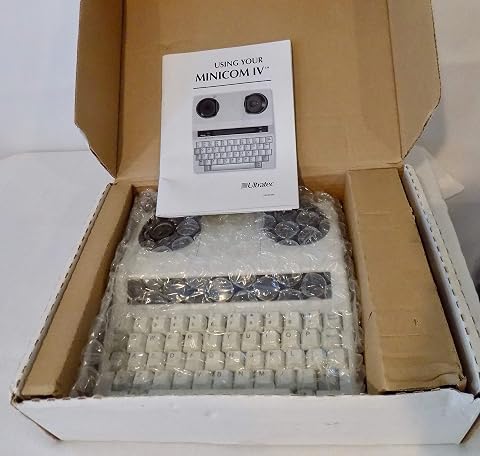
The Ultratec Minicom IV is a basic TTY for text-based telephone communication. It features an easy-touch keyboard, a slanted 20-character display, a printer port for an external printer, and Turbo Code for real-time conversations with compatible TTYs.
Pros:
- Easy-touch keyboard
- Slanted display designed for comfortable operation
- Printer port supports an external printer
- Turbo Code enables real-time conversations with compatible TTYs
Cons:
- Basic communication features
- Extended warranty, dust protection, and carry case are listed as options
Best for: Shoppers checking whether this named telephone aid fits their calling needs
Not ideal for: People who have not confirmed its functions and connection requirements
Bottom line: Consider the Ultratec Minicom IV TTY only after confirming its specific functions, compatibility, and setup requirements.
Bluetooth TV Transmitter
A Bluetooth TV transmitter may help route television audio to compatible listening equipment, but the right choice depends on the devices you already use. This slot offers advice rather than a named product. Begin by identifying the television’s available audio connections and the receiving device you want to use; compatibility is essential for the setup to work as intended.
One common mistake is to buy a transmitter because it mentions Bluetooth without checking whether it supports the television’s output and the specific headphones or hearing equipment. Review the connection types on both sides, any pairing or adapter requirements, and whether the controls make it practical to use alongside the TV. Consider where the transmitter will sit, how it will receive power, and whether the cable arrangement suits your room. If you share the television, think through how the setup will affect other listeners. Match both ends of the connection before selecting a model, and confirm the required audio format or accessories with the device documentation.
What to look for:
- A transmitter connection that matches the TV’s audio output
- Compatibility with the headphones or listening device you plan to use
- Any needed adapters, cables, or pairing steps
- Power and placement suited to your TV area
- Controls and setup that fit shared viewing habits
Personal Sound Amplifier
This slot names the ELEHEAR Beyond Pro OTC Hearing Aids, Bluetooth Rechargeable, Champagne. When considering any personal listening aid, start with the situations in which you want support and whether the named product’s functions and setup fit those situations. Its name indicates Bluetooth and rechargeable features, but check the product details to confirm how those features work and what equipment they support.
A common mistake is to decide from a product name or appearance without checking comfort, controls, and fit. Review the available fitting options, instructions for adjusting and charging the device, and whether the controls are manageable for the intended user. If Bluetooth use matters, verify compatibility with the phone or other devices you plan to connect. Consider how the device will feel during your usual activities and whether you can operate it independently. Check fit and connectivity against your own equipment and preferences, and consult a hearing care professional when you need help evaluating hearing needs or fitting options.
What to look for:
- Fitting options and instructions for achieving a comfortable fit
- Controls that are easy for the intended user to operate
- Charging steps and accessories included or required
- Bluetooth compatibility with your specific devices
- Product information that clearly explains adjustment and support
ELEHEAR Beyond Pro OTC Hearing Aids, Bluetooth Rechargeable, Champagne Gold

The ELEHEAR Beyond Pro OTC hearing aids provide natural, clear sound with 30% improved speech clarity using VocClear 2.0 technology. Featuring Bluetooth 5.3, a rechargeable battery offering up to 20 hours of use, and a user-friendly app, these devices are designed for comfort and ease of use for seniors with mild to moderate hearing loss.
Pros:
- Provides clear, natural sound with enhanced speech clarity
- Long battery life with quick 15-minute charging
- Easy-to-use app with personalized sound adjustments
- Comfortable, lightweight design suitable for all-day wear
Cons:
- Designed for mild to moderate hearing loss only
- Requires smartphone for full functionality
- Premium features may come at a higher price
Best for: People evaluating a rechargeable, Bluetooth-named OTC hearing aid
Not ideal for: People who need a confirmed fit or device compatibility without checking product details
Bottom line: Review fit, charging, controls, and Bluetooth compatibility before choosing the ELEHEAR Beyond Pro OTC Hearing Aids.
Vibrating Alarm Clock
The Sonic Alert SB1000SS Sonic Boom Alarm Clock is the named pick for this vibrating alarm clock slot. An alarm setup should match how the intended user wakes and where the clock can be placed. Check the product details to confirm its alert methods and what accessories, if any, are needed for vibration or other alert options.
A common mistake is to assume that a clock’s name tells you exactly how its alerts work or where a vibrating component should go. Confirm the included equipment, power requirements, alarm controls, and placement guidance before purchase. Think about whether the clock will be on a bedside table, whether controls are easy to reach, and whether the user needs to adjust settings independently. If more than one alert method is important, verify each one in the product documentation rather than relying on assumptions. Plan the placement in advance so the setup fits the bedroom and the user’s routine, and check that the chosen alert method suits the person who will rely on it.
What to look for:
- Confirmed alert methods and how each one operates
- Whether any vibrating accessory is included or required
- Power requirements and backup arrangements
- Controls that are accessible from the intended placement
- Clear instructions for setup, alarm adjustment, and testing
Sonic Alert SB1000SS Sonic Boom Alarm Clock
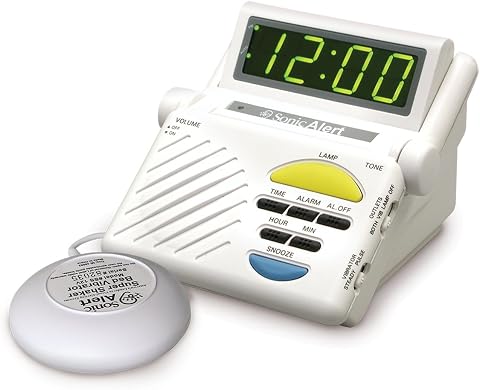
The Sonic Boom Alarm Clock is designed for heavy sleepers, featuring a 113 dB loud alarm with adjustable tone and volume, flashing lights, and a vibrating bed unit. It includes a built-in receiver for other Sonic Alert signalers, a large LED display, and a battery backup to ensure you wake up on time even during power outages.
Pros:
- Extremely loud 113 dB alarm suitable for heavy sleepers
- Multiple waking options including sound, flashing lights, and vibration
- Built-in receiver for additional Sonic Alert signalers
- Large, bright LED display with adjustable viewing angle
Cons:
- Requires 9V battery (not included)
- May be too loud for light sleepers or others in the same room
- Limited to indoor use
Best for: People considering a named alarm clock for a vibration-focused alert setup
Not ideal for: People who have not verified the clock’s alert methods or required accessories
Bottom line: Check the Sonic Alert SB1000SS’s alert features, included equipment, and placement requirements before setting it up.
Visual Alert Doorbell
The named pick is the Wireless Warehouse Doorbell Kit with Flashing Strobe – 4000 ft Range L. A visual doorbell alert may help make a visitor’s arrival easier to notice, so consider where the alert needs to be seen and who needs to see it. Confirm the kit’s actual components and alert behavior in its product details before deciding how it will fit your home.
A common mistake is to treat a stated range as a guarantee for every home layout. Walls, placement, and other conditions can affect wireless performance, so check the seller’s guidance and plan where the transmitter and flashing strobe would go. Verify what is included, how the kit is powered, and whether mounting or setup supplies are needed. Consider whether the strobe will be visible from the rooms where the intended user spends time, and whether the alert is noticeable in the surrounding lighting. Check coverage and visibility in the places that matter, and confirm any range or installation details with the manufacturer before relying on the system.
What to look for:
- A clear list of included transmitters, receivers, and accessories
- Power requirements for each component
- Placement guidance for the strobe and doorbell transmitter
- Visibility of the flashing alert from relevant rooms
- Manufacturer details on range and installation conditions
Wireless Warehouse Doorbell Kit with Flashing Strobe – 4000 ft Range Loud Entry

This wireless doorbell kit features a flashing strobe light and a multi-function transmitter that works as a push button or magnetic door contact sensor, with a range of up to 4000 feet. The plug-in receiver offers adjustable volume, multiple melodies, and additional outputs, making it suitable for noisy industrial and commercial environments.
Pros:
- Long transmission range of 4000 feet
- Adjustable volume and multiple melodies
- Bright visual strobe for hearing-impaired users
- Versatile as push button or magnetic sensor
Cons:
- Requires power outlet for receiver
- May be overkill for small spaces
- Limited to industrial and commercial use
Best for: People seeking a wireless doorbell kit with a flashing strobe alert
Not ideal for: People who need confirmed coverage without checking home layout and placement
Bottom line: Confirm the kit contents, power, strobe visibility, and realistic coverage before installing the Wireless Warehouse doorbell kit.
If you are choosing in stages, begin with the communication or alerting need that affects your day most often, then prioritize the equipment and connections required to make that aid usable. Check compatibility, fit, setup, and accessories before comparing optional features. Cover the essentials first, and add other aids as your needs and setup become clearer.
Use this checklist as a starting point, and confirm product details with the manufacturer or seller when a feature or connection is uncertain. The right choice is the one that works with your routine, equipment, and preferences. Take it one step at a time and focus on making communication and alerts easier in the situations that matter to you.
Evergreen bestsellers Picks
bestsellers
As an affiliate, we earn on qualifying purchases.