This checklist is for deaf and hard of hearing travelers who want to think through alerts, listening support, and hearing device care before a trip. It can help you organize questions to ask while choosing travel gear.

Get everyday helpers delivered free with Prime
- Fast, free delivery on millions of items
- Prime Video, Amazon Music and more included
- Member-only deals all year
The sections follow the six product slots in the order provided: a vibrating alarm, a visual alerting system, a hearing aid streamer, a personal sound option, a hearing aid dryer, and an audio recorder.
Use each section as a shopping prompt, then confirm the device’s features, compatibility, and travel suitability with its manufacturer or seller. Product names alone do not confirm that a particular item will work with your hearing devices or meet your needs.
Portable vibrating alarm clock
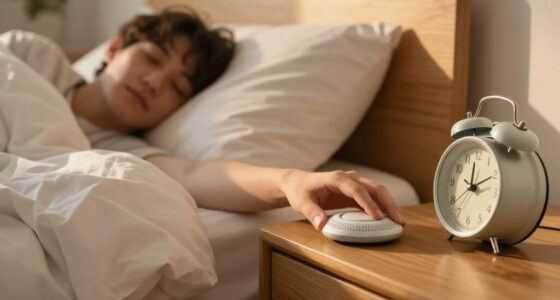
A portable vibrating alarm can be a useful checklist item when you rely on a wake-up alert while away from home. The bed shaker in this pick’s name signals a tactile alert option to investigate. Before choosing it for travel, confirm how the alarm and shaker are powered, how they connect, and whether the setup is practical for the places you stay.
A common buying mistake is assuming that “portable” means compact, self-contained, or easy to pack. Check the dimensions and packed weight, what accessories are included, and whether the shaker needs a cable or a specific placement to work as you expect. Ask about battery or outlet requirements, plug compatibility for your destination, and whether settings are retained if power is interrupted. If you share a room, consider whether the alert method suits your sleeping arrangement.
Compare the alarm’s controls and display with how you prefer to set and check alarms. Confirm return terms and support before travel, and test the complete setup at home so you know how it behaves before relying on it overnight.
What to look for:
- Confirm whether the alarm and shaker require outlet power, batteries, or both.
- Check the clock’s dimensions, weight, and included accessories.
- Ask how the bed shaker connects and where it should be placed.
- Verify plug and power compatibility for your destination.
- Test the alarm, shaker, and settings before traveling.
Sonic Bomb Dual Extra Loud Alarm Clock with Bed Shaker, Black
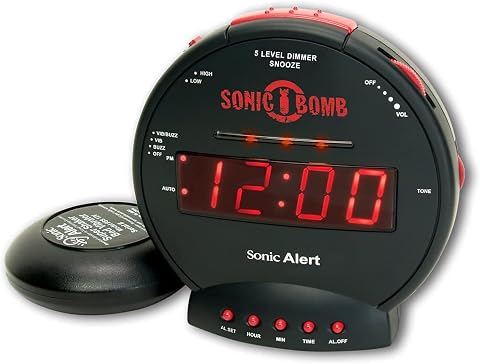
This alarm clock features 113dB loud sound, adjustable volume and snooze durations, and a vibrating bed shaker to ensure heavy sleepers wake up on time. It includes flashing alert lights and multiple modes for personalized wake-up settings, making it ideal for students, heavy sleepers, and those with hearing impairments.
Pros:
- Extremely loud alarm suitable for heavy sleepers
- Vibrating bed shaker ensures waking up even in deep sleep
- Adjustable alarm duration and snooze time for customization
- Includes flashing lights and multiple alert modes
Cons:
- May be too loud for light sleepers or sensitive environments
- Bulkier design might not suit all bedside setups
- Requires electrical power with backup batteries
Best for: Travelers seeking a vibrating alarm option to evaluate
Not ideal for: Anyone needing confirmed travel power details before purchase
Bottom line: Check the power requirements, shaker connection, and packed size before deciding whether this alarm fits your trip.
Visual smoke and carbon monoxide alarm
A visual alerting system belongs on a travel checklist when you want to investigate how smoke and carbon monoxide alerts can be made accessible. The listed HomeAware II Basic Starter Kit is described as an alerting system, but its name alone does not establish which alarms, visual indicators, or accessories are included. Confirm the package contents and how the system is intended to work.
A frequent mistake is treating an alerting system as a universal replacement for a property’s installed safety equipment. Ask whether the kit detects smoke or carbon monoxide itself, receives signals from separate detectors, or serves another alerting role. Check compatibility and coverage with any required sensors, and confirm how alerts are delivered in the room where you will sleep. Find out what power sources and setup steps are needed, and whether the system can be used in a hotel or other temporary lodging.
For travel, portability and setup time matter alongside alert type. Review the instructions before packing, and ask the lodging provider what safety equipment is already available and what accommodations can be arranged. Do not assume that a starter kit will include every component needed for your particular setup.
What to look for:
- Confirm exactly what the starter kit includes and what must be purchased separately.
- Ask whether it detects hazards or receives alerts from compatible detectors.
- Check how visual alerts are delivered and where the indicator must be placed.
- Verify power, setup, and sensor compatibility requirements.
- Ask lodging staff about available accessible alerts and safety equipment.
Sonic Alert HomeAware II Basic Starter Kit – Alerting System for Deaf/Hard of He

The Sonic Alert HomeAware II Basic Starter Kit is an alerting system designed for deaf, hard of hearing, or heavy sleepers. It listens to existing smoke and CO alarms, providing visual, tactile, and audio alerts, and can display caller ID and incoming calls via Bluetooth connection.
Pros:
- Effective alert system for deaf and hard of hearing individuals
- Multiple alert modes including strobe, bed shaker, and visual display
- Connects to existing smoke and CO alarms for easy setup
- Includes caller ID and phone alerts via Bluetooth
Cons:
- Requires existing smoke and CO alarms for operation
- Limited to acoustic pattern detection, not a standalone alarm
- Customer rating indicates moderate satisfaction
Best for: Travelers evaluating a visual alerting setup for lodging
Not ideal for: Anyone expecting a complete detector without checking kit contents
Bottom line: Confirm what the kit alerts you to, what components it includes, and whether it works with your lodging setup.
Bluetooth hearing aid streamer
A wireless microphone or streamer can be worth considering when you want to explore listening support for conversations while traveling. The product name identifies the Oticon EduMic as a wireless remote microphone system for Oticon devices, so compatibility is the first question to resolve. Ask the manufacturer or hearing care professional whether it works with your specific hearing aid models and configuration.
A common mistake is buying based on the word “wireless” without confirming the connection path. Check whether your hearing aids need an intermediary accessory, how pairing works, and what controls are available to the wearer and speaker. Ask about microphone placement and range, charging or battery requirements, and whether the system can be used in the situations you have in mind, such as conversation across a table. The product name does not establish that it pairs directly with every phone or Bluetooth source.
For travel, find out what needs charging, how to carry the microphone, and whether setup can be completed without internet access. Practice with the exact hearing aids and streamer before departure. If you use more than one pair or a backup device, check compatibility for each one rather than assuming a single pairing applies to all.
What to look for:
- Confirm compatibility with your exact Oticon hearing aid models.
- Ask how the EduMic connects and whether additional accessories are needed.
- Check microphone range, placement, and available controls.
- Verify charging or battery needs for the microphone and hearing aids.
- Practice pairing and use with your actual devices before travel.
Oticon EduMic Streamer Wireless Remote Microphone System for Oticon Pediatric He

The Oticon EduMic is a wireless remote microphone system designed for use with Oticon pediatric hearing aids. It features durable construction, practical sizing, and versatile functionality suitable for various professional and personal applications.
Pros:
- Wireless streaming for convenience
- Durable construction ensures long-term use
- Broad compatibility with standard systems
- Designed for easy use and storage
Cons:
- Limited to Oticon pediatric hearing aids
- No specific technical specifications provided
Best for: Oticon users confirming a remote microphone option
Not ideal for: Travelers whose hearing aid compatibility is unknown
Bottom line: Ask your hearing care professional to verify compatibility and connection steps for your specific hearing aids.
Personal sound amplifier
This slot covers personal listening support, but the listed product is named as self-fitting hearing aids, not simply a sound amplifier. The distinction matters when you are comparing options: confirm the product category, what the device is designed to do, and whether it fits your hearing needs. The product name alone cannot establish suitability for an individual.
A common mistake is assuming that a self-fitting device will be ready to use without setup or guidance. Review how fitting and adjustments work, what phone or app requirements apply, and whether you can complete setup while traveling. Check device and phone compatibility, charging needs, included accessories, and how to get support if settings need adjustment. Ask a qualified hearing professional whether this option is appropriate for you, especially if you already use hearing aids or have specific listening needs.
Consider how the devices will be stored and charged during a trip, and whether you have a plan if a charger is misplaced or a device needs service. Read the instructions before departure and practice any fitting steps at home. Confirm return and support policies so you understand what help is available after purchase.
What to look for:
- Confirm the product category and intended use with the seller or manufacturer.
- Ask a hearing professional whether the devices suit your hearing needs.
- Check fitting steps, adjustment options, and phone or app requirements.
- Verify charging, accessories, and device compatibility before travel.
- Review support, service, and return terms before purchase.
Jabra Enhance Select M2 Swift FDA-Cleared Self-Fitting Hearing Aids, Sand

These lightweight, discreet hearing aids adjust to changing environments to help clarify speech and reduce background noise. They offer app-based self-fitting and sound controls, Bluetooth streaming and hands-free calls, and up to 24 hours of listening per charge with an included portable charger.
Pros:
- Self-fitting setup and sound personalization through an app
- Automatically adjusts volume to help clarify speech in changing environments
- Supports hands-free calls and Bluetooth audio streaming
- Lightweight design with IP68 protection
Cons:
- Requires a compatible Apple or Android device for app controls and setup
- Battery runtime varies by use; the description does not specify charging time
Best for: Shoppers exploring self-fitting hearing aid options
Not ideal for: Anyone assuming the product is a simple amplifier
Bottom line: Clarify the product’s intended use and setup requirements before adding it to your travel kit.
Waterproof hearing aid dryer
A hearing aid dryer or dehumidifier may be relevant if you want a plan for caring for hearing devices while traveling. The listed Redux Home dryer is named as a hearing aid dryer and dehumidifier with a self-recharging desiccant feature. Confirm what hearing aid styles and accessories it can accommodate, and ask whether its intended use matches your care routine.
A common mistake is reading “waterproof” as a guarantee that either the dryer or hearing aids can be exposed to water. The product name does not establish water resistance for either item. Check the manufacturer’s instructions for moisture care and limitations, including what not to place in the unit. Ask about the dryer’s size, power source, cycle time, and whether it can be used safely with the hearing aids or accessories you own. Confirm whether the desiccant needs maintenance and how the self-recharging feature works.
For trips, compare the dryer’s packed size and charging needs with your itinerary and lodging. Check whether the unit is designed for travel or home use, and whether an adapter is required at your destination. Practice the routine before leaving so device care does not depend on learning unfamiliar controls after arrival.
What to look for:
- Confirm that the dryer accommodates your hearing aid styles and accessories.
- Read manufacturer guidance on moisture exposure and device care.
- Check packed size, power source, and destination plug needs.
- Ask how the desiccant feature works and what maintenance it needs.
- Practice the drying routine before traveling.
Redux Home Hearing Aid Dryer & Dehumidifier with Self-Recharging Desiccant

The Redux hearing aid dryer removes all moisture using active drying technology with a self-recharging desiccant system, ensuring safe and effective drying for rechargeable hearing aids, AirPods, and earbuds. It features Bluetooth app connectivity for moisture reporting and completes a drying cycle in approximately two hours, providing a maintenance-free solution for device care.
Pros:
- Effective moisture removal with active drying technology
- Self-recharging desiccant system eliminates ongoing costs
- Bluetooth app connectivity for moisture tracking and confirmation
- Safe for rechargeable hearing aids and delicate earbuds
Cons:
- Limited capacity may not suit multiple devices simultaneously
- Drying cycle duration of 2 hours may be longer than some users prefer
- Requires Bluetooth connection for full feature use
Best for: Hearing aid users considering a drying routine on trips
Not ideal for: Anyone expecting waterproof protection for their hearing aids
Bottom line: Verify device compatibility, care limits, and power requirements before packing a dryer.
Pocket audio recorder
A pocket audio recorder can be a checklist option for capturing audio, but its usefulness depends on how you plan to use recordings and access them. The Zoom H1essential product name describes a portable two-track recorder with 32-bit float recording. Confirm the controls, file handling, and listening or transfer options that matter for your own workflow.
A common buying mistake is assuming that a recorder automatically provides captions, transcripts, or accessible playback. Those features are not established by the product name, so ask the manufacturer what accessibility functions are available and what additional software or equipment may be needed. Check recording and transfer compatibility with your computer or phone, storage requirements, battery or power needs, and the cables included. If you intend to record conversations, consider consent and any applicable rules at your destination.
Think through how you will review recordings while traveling: whether you need headphones, a compatible device, or a separate transcription process. Confirm that the recorder’s interface is manageable for you and practice starting, stopping, saving, and transferring a file before departure. A short at-home trial can reveal missing accessories or steps to resolve before your trip.
What to look for:
- Ask what accessibility features the recorder provides, including any transcription support.
- Check storage, power, cables, and included accessories.
- Confirm file transfer and playback compatibility with your devices.
- Practice recording, saving, and transferring audio before departure.
- Consider consent and local rules before recording conversations.
Zoom H1essential 2-Track 32-Bit Float Portable Audio Recorder with APH-1e Access

The Zoom H1essential is a compact portable audio recorder featuring 32-bit float recording, eliminating the need to adjust levels and ensuring high-quality audio every take. Onboard X/Y microphones capture clean sound up to 120 dB SPL, with features like overdubbing, pre-record, auto record, and playback speed adjustment.
Pros:
- 32-bit float recording eliminates the need to set audio levels
- Compact size with onboard X/Y mics handling up to 120 dB SPL
- Strong accessibility support for visually impaired users in 7 languages
- Bundle includes useful accessories like windscreen, case, and memory card
Cons:
- Only 2 tracks, limiting multi-input recording
- Relies on AAA batteries rather than rechargeable built-in power
Best for: Travelers who want a portable audio recording option
Not ideal for: Anyone relying on automatic captions without confirming support
Bottom line: Confirm accessibility functions and file transfer steps before relying on the recorder while traveling.
Build your checklist in a needs-first order: start with alerts and device compatibility that affect your stay, then consider listening support and hearing device care, followed by recording tools. Compare what each item requires—power, accessories, setup, and compatible equipment—before deciding what deserves space in your luggage.
Use the product names as starting points, verify details with manufacturers and your hearing care professional, and try your setup before departure. A little preparation can help you travel with more confidence and a clearer plan for the situations that matter to you.