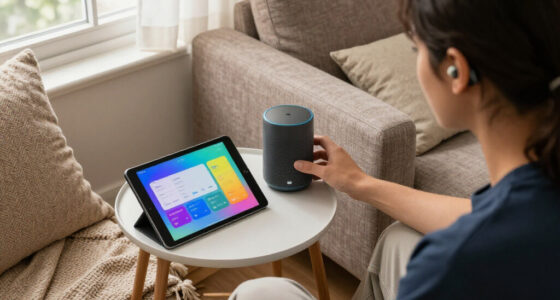

This checklist is for people who are hard of hearing, older adults, and anyone helping them choose home listening and alerting products. The picks cover TV audio, personal sound amplification, doorbell alerts, and waking up; two sections offer selection advice without naming a product. Start with the listening or alerting problem you want to solve.

Get everyday helpers delivered free — and shop member deals
- Fast, free delivery on millions of items
- Access to Prime Big Deal Days deals on October 6–7
- Prime Video, Amazon Music and more included
Each section focuses on one kind of support. Product names identify the listed pick, while the guidance highlights practical details to check before buying. Features and compatibility can vary, so confirm them with the seller or manufacturer for the exact model.
Use the checklist to compare your needs with the product’s documented features, setup requirements, and fit. Consider who will use it, where it will be used, and whether the controls are manageable. Check return terms and support options before ordering, especially when comfort or setup is uncertain.
TV Listening Headphones
A dedicated TV listening option can help someone follow dialogue without relying only on the television’s built-in speakers. The listed pick is the Avantree Duet Aura – HDMI ARC Dual Wireless TV Headphones for Seniors. The product name identifies HDMI ARC and dual wireless headphones; confirm the exact connection and included components for the model you are considering. Start by checking the television’s available audio outputs and whether the setup instructions cover them.
A common buying mistake is assuming that a named connection guarantees compatibility with every TV or sound setup. Check how audio is routed, whether the TV needs a setting changed, and whether other listeners can still use the speakers as desired. Also clarify what “dual” means for the specific package and whether a second listener needs a separate headset. Read the connection and simultaneous-listening details before purchase.
Comfort and everyday handling matter as much as connection. Consider who will wear the headphones, whether the fit is comfortable for a full program, and how charging, storage, and volume adjustment work. If the wearer uses glasses or has dexterity limitations, review the design and controls carefully. Prioritize an easy setup and comfortable fit, then compare the documented features with the household’s listening routine.
What to look for:
- Confirm the TV has a compatible HDMI ARC connection and settings.
- Check what the package means by dual wireless listening.
- Verify whether TV speakers can operate at the same time.
- Review headset fit, controls, charging, and storage.
- Check setup instructions and support for the exact TV model.
Avantree Duet Aura – HDMI ARC Dual Wireless TV Headphones for Seniors
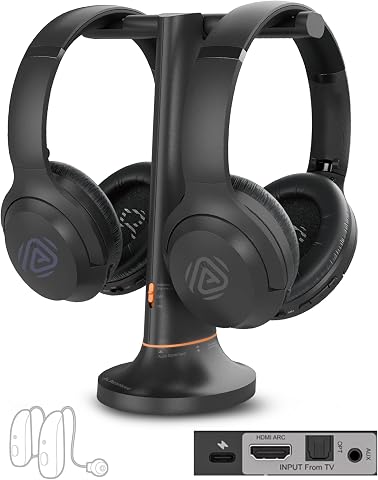
The Avantree Duet Aura offers dual wireless TV headphones with a charging dock, allowing two viewers to listen at different volumes simultaneously. It connects via HDMI ARC, Optical, or AUX, and features clear voice modes and independent volume controls.
Pros:
- Allows two users to listen at different volumes simultaneously
- Multiple connection options for compatibility with various TVs
- Features clear voice modes and independent volume controls
- Supports audio sharing with additional Auracast-compatible devices
Cons:
- HDMI ARC may disable TV speakers depending on TV settings
- Does not support HDMI ARC soundbar pass-through
- Requires setup with compatible TVs and devices
Best for: Households seeking a dedicated wireless TV listening setup
Not ideal for: People whose TV connection or control needs are not supported
Bottom line: Confirm the TV connection, sharing behavior, and headset comfort before choosing this pick.
Personal Sound Amplifiers
Personal sound amplifiers are intended to make nearby sounds easier to hear, but their suitability depends on the listener and the specific device. The listed pick is the iBston Nova In-Ear Hearing Aids for Seniors. Because product naming alone does not establish its functions or medical status, verify the manufacturer’s description and intended use before buying. Match the device to the listener’s needs, and seek professional hearing advice when appropriate.
A frequent mistake is assuming that an in-ear product will fit comfortably or provide the same experience for every user. Check how the product is sized or fitted, what is included, and whether the seller explains returns or help with fit. Review the controls and care instructions, especially if the wearer has limited dexterity or vision. Fit and handling should be checked before purchase, not inferred from the product title.
Also confirm how the device is powered, maintained, and adjusted, using the exact product documentation. Ask whether it is intended for the situations the listener cares about, such as conversation at home, and what limitations the manufacturer describes. Do not treat a product label as a substitute for an evaluation of hearing needs. Check the intended use and support pathway so the purchase fits into a practical plan.
What to look for:
- Verify the manufacturer’s intended use and product classification.
- Check available sizing, fitting guidance, and return terms.
- Review adjustment controls and whether they are manageable for the wearer.
- Confirm power, care, and maintenance requirements in the documentation.
- Ask a hearing professional whether the device suits the listener’s needs.
iBston Nova In-Ear Hearing Aids for Seniors

These lightweight, in-canal hearing aids are designed for adults with mild hearing loss and operate with a single on-device button, without requiring an app or setup. A 1.5-hour charge provides up to 20 hours of use, and the package includes nine pairs of ear tips, a 30-day trial, and 12 months of service.
Pros:
- Lightweight, in-canal design
- Simple one-button operation with no app required
- Up to 20 hours of use per charge
- Includes nine pairs of ear tips
Cons:
- Designed for mild hearing loss
- The description provides no independent evidence for its performance claims
Best for: Shoppers considering an in-ear personal sound product
Not ideal for: Anyone who has not confirmed fit or suitability for their needs
Bottom line: Verify intended use, fitting support, and professional guidance before choosing this product.
Phone Amplified Ringers
A phone ring that is easy to miss can disrupt calls and leave the household unsure whether someone tried to reach them. Before shopping, identify which phone needs a clearer alert and where it is used. Start with the phone type and connection: landline and mobile setups can require different approaches, so confirm what the phone manufacturer supports.
A common mistake is choosing an alert without checking how it connects or whether it can be heard or seen from the rooms that matter. Consider the user’s hearing and vision, the home layout, and whether a visual cue or vibration would be more useful than a louder sound. Check whether the alert can be adjusted and how it is powered. Match the alert to the phone and the room, rather than relying on a generic description.
Think through installation and daily use before ordering. Confirm whether the device requires a compatible phone port, app, or separate transmitter, and whether the user can manage its controls. For shared spaces, consider whether the alert would be noticeable without being disruptive to others. Check compatibility, placement, and setup instructions with the exact phone model and alert device.
What to look for:
- Confirm compatibility with the exact landline or mobile phone.
- Check connection method and whether extra components are required.
- Consider sound, visual, or vibrating alert options for the user.
- Review alert adjustment, power, and placement requirements.
- Make sure setup and everyday controls are manageable.
Visual Alert Doorbells
A visual doorbell alert can make a visitor’s arrival easier to notice when an audible chime is not enough. The listed pick is the Wireless Warehouse Doorbell Kit with Flashing Strobe – 4000 ft Range L. Its name identifies a flashing strobe and a stated range; verify the manufacturer’s specifications and package contents for the exact kit. Confirm that the alert is visible from the places the household needs to notice it.
A common mistake is relying on a range claim without considering walls, layout, placement, and other conditions that affect signal or visibility. Check what components are included, how the doorbell is installed, and whether the kit suits the home’s entry setup. If the user may not see a single alert location, ask whether additional receivers or placement options are supported. Check coverage in the actual home and verify any expansion details directly.
Consider the strobe’s location and whether the intended user will notice it during ordinary routines. Review power requirements, weather exposure for the outdoor component, and the steps needed to pair or maintain the devices. The product name does not confirm installation details or performance in a particular home. Use the product documentation to confirm setup, then choose a placement that makes the alert practical for the user.
What to look for:
- Verify what components the kit includes and how they connect.
- Check the range specification and account for the home’s layout.
- Confirm strobe placement will be visible to the intended user.
- Review installation, power, and maintenance requirements.
- Check support for additional receivers if broader coverage is needed.
Wireless Warehouse Doorbell Kit with Flashing Strobe – 4000 ft Range Loud Entry

This wireless doorbell kit features a flashing strobe light and a multi-function transmitter that works as a push button or magnetic door contact sensor, with a range of up to 4000 feet. The plug-in receiver offers adjustable volume, multiple melodies, and additional outputs, making it suitable for noisy industrial and commercial environments.
Pros:
- Long transmission range of 4000 feet
- Adjustable volume and multiple melodies
- Bright visual strobe for hearing-impaired users
- Versatile as push button or magnetic sensor
Cons:
- Requires power outlet for receiver
- May be overkill for small spaces
- Limited to industrial and commercial use
Best for: Homes where a visible doorbell signal would help
Not ideal for: Layouts where the strobe cannot be seen from needed areas
Bottom line: Check actual-home coverage, visibility, and installation requirements before choosing this kit.
Vibrating Alarm Clocks
A vibrating alarm can offer a waking cue that does not depend only on hearing a bedside sound. The listed pick is the Sonic Alert Sonic Bomb Dual Alarm Clock with Bed Shaker. The name identifies a dual alarm clock and bed shaker; confirm the exact included accessories and how the alarms work in the product documentation. Check that the waking signal suits the user and their sleeping arrangement.
A common buying mistake is assuming the shaker will fit every bed or feel comfortable to every sleeper. Verify its placement requirements, cord reach, and the manufacturer’s guidance for the bed setup. Consider whether the user shares a bed and whether the alert might disturb another sleeper. Think through placement and shared use before committing to a particular configuration.
Review how alarm times are set, whether the user can operate the controls, and what happens during a power interruption. Check whether any battery backup is included or supported rather than assuming it from the product category. The user should be able to reach and adjust the controls without difficulty. Confirm power behavior and control accessibility in the exact model’s instructions before purchase.
What to look for:
- Confirm the bed shaker is included and review its placement instructions.
- Check cord reach and compatibility with the sleeping setup.
- Review how to set and manage the dual alarms.
- Verify power requirements and any backup behavior.
- Consider shared-bed impact and the user’s ability to operate controls.
Sonic Alert Sonic Bomb Dual Alarm Clock with Bed Shaker

This digital alarm clock has an adjustable alarm volume reaching 113 dB, flashing alert lights, and a bed shaker with vibration, buzz, and combination modes. It includes adjustable alarm duration and snooze settings, a five-level display dimmer, and battery backup.
Pros:
- Very loud adjustable alarm with flashing alert lights
- Bed shaker offers three alert modes
- Adjustable alarm duration and snooze time
- Five-level display dimmer and battery backup
Cons:
- Requires a separate 9V battery for backup
- Large footprint for a tabletop clock
Best for: Sleepers who want a vibrating waking cue
Not ideal for: People whose bed setup or controls do not suit the device
Bottom line: Confirm shaker placement, alarm controls, and power details for the exact model.
Assistive Listening Neckloops
A neckloop can be one way to route audio to compatible hearing equipment, but whether it is useful depends on the user’s devices and listening source. Start by identifying the hearing aid or cochlear implant model and checking whether it supports a telecoil or another compatible connection. Verify compatibility with the wearer’s equipment before comparing neckloops.
A common mistake is treating neckloops as universal accessories. Check the connection type, the audio source, and any adapters needed for the intended phone, TV, or other device. Ask the equipment provider or manufacturer to confirm the complete connection path. Confirm every link in the setup so that the loop can work with both the listening source and the user’s equipment.
Fit and handling also affect everyday use. Consider whether the loop sits comfortably, whether cables or connectors are manageable, and whether controls are accessible to the wearer. Review charging or power needs and care guidance for the specific product. If the user is unsure about telecoil settings or device configuration, ask their hearing care professional for help. Choose around the listener’s devices and routine, not the accessory label alone.
What to look for:
- Check whether the hearing aid or implant supports a compatible input.
- Confirm the connection type for the intended audio source.
- Ask whether adapters or additional equipment are needed.
- Review fit, cable handling, controls, and power requirements.
- Consult the equipment provider about configuration and compatibility.
Start with the need that affects daily life most, then confirm compatibility before choosing accessories. For TV listening, check the television connection; for personal amplifiers and neckloops, check the wearer’s equipment and fit; for phone and door alerts, check the phone or home layout; for waking, check bed setup and controls. Spend your research effort on fit and compatibility first, then compare included components and setup demands.
Bring the checklist to a retailer or hearing care professional and ask them to confirm any model-specific details you cannot verify. A well-matched device should make its intended task easier to manage at home. Take it one need at a time, and choose the option the user can set up and use comfortably.
Halloween Picks
halloween
As an affiliate, we earn on qualifying purchases.