The Hamilton CapTel 2400iSPNBT Large Touch Screen Captioned Telephone is designed to improve phone conversations for people with hearing impairments. Its biggest strength is providing **real-time, large-font captions** on a responsive touchscreen that makes understanding speech straightforward. The main drawback is its reliance on a stable internet connection and registration process, which could complicate setup. Overall, this device offers a targeted solution that can significantly enhance communication for users who need visual cues and amplification, but it comes with some logistical considerations that might make it less suitable for users outside the US or those lacking internet access.

Get everyday helpers delivered free — and shop member deals
- Fast, free delivery on millions of items
- Access to Prime Big Deal Days deals on October 6–7
- Prime Video, Amazon Music and more included
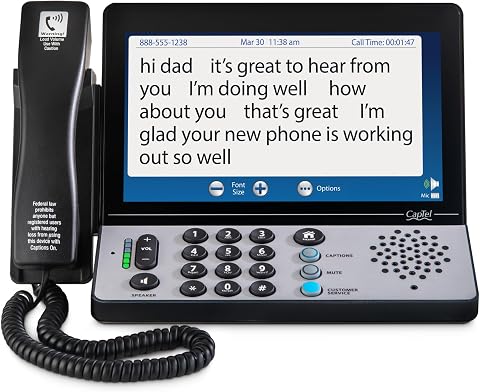
Hamilton CapTel 2400iSPNBT Large Touch Screen Captioned Tele
- ✔ Model: 2400iSPNBT
- ✔ Screen: Large touchscreen
- ✔ Amplification: Up to 40dB gain
Why This Product Stands Out
This device stands out primarily for its focus on **visual accessibility** combined with powerful amplification, making it especially suitable for those who struggle to hear or process spoken words. Unlike traditional landline phones, the CapTel 2400iSPNBT integrates **real-time captioning** directly on a large touchscreen, transforming the phone into a communication hub that caters to modern needs. Its ability to switch between **automatic captions and live operator-assisted captions** gives users control over their experience, which is not always available with standard captioned phones.
Compared to other captioned phones that may rely solely on audio amplification or basic display, this model offers a **more comprehensive visual solution**. Its design aligns with expectations for a mid-range device, providing a balance of usability, accessibility, and advanced features. It also surpasses many older models by incorporating **Hearing Aid Compatibility** and a **captioned voicemail**, making it a practical choice for daily use. Nonetheless, its reliance on internet connectivity and registration procedures sets it apart from more straightforward landline options, positioning it as a solution best suited for users comfortable with some digital setup.
Key Features and What They Mean
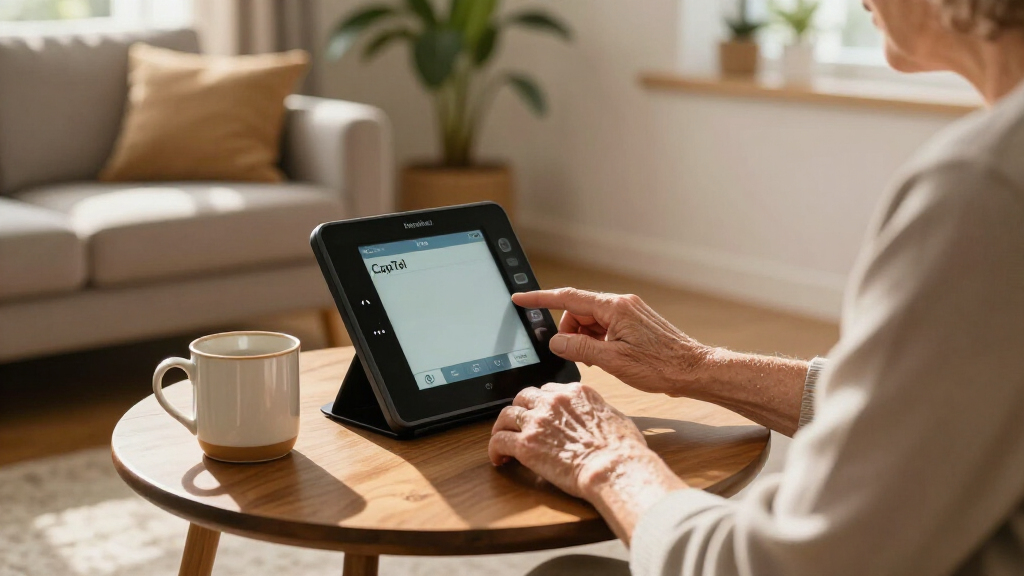
The large touchscreen makes captions easier to read at a glance, so callers who miss words by listening alone can follow the conversation without repeatedly asking for clarification. Its touch controls also let users navigate calls and settings directly on the screen, which can be more accessible than small physical buttons for people with limited dexterity or vision.
Up to 40dB amplification gives users who have difficulty hearing the caller’s voice another way to understand the conversation. The benefit is greatest for people who still rely on audio as well as captions; those who depend primarily on visual text may value the display more. Hearing aid compatibility can make the phone easier to use alongside compatible personal hearing devices, reducing the need to switch between equipment during calls. Users should confirm compatibility with their particular hearing aids.
The free, 24/7 captioning service means captions are available at different times of day without a per-call captioning fee, which can matter to people who make frequent calls or need to reach others outside business hours. The choice of automatic or live operator-assisted captions gives users options for how calls are captioned; an operator may be useful when a conversation is difficult to follow, while automatic captions support a more self-directed experience.
Captioned voicemail lets users read messages they could not answer, helping them catch up without relying on another person to listen and explain. Internet access and electrical power are necessary for the phone’s connected captioning service, so the device is best for a stable home setup rather than travel or locations with frequent outages. Registration verifies eligibility for the service, but adds a setup step that buyers should be prepared to complete.
Performance and Real-World Use
This device is designed for straightforward, daily use once set up. The **large touchscreen** simplifies navigation and reading, reducing frustration often associated with smaller displays. Its **amplification and hearing aid compatibility** work together to improve sound clarity, making conversations more accessible in diverse environments. Setup involves connecting to Wi-Fi, registering with the captioning service, and adjusting preferences, which could take some initial time but results in a personalized experience.Maintenance is minimal—regular updates and internet connectivity are the main ongoing requirements. The device’s durability aligns with typical desktop or home-use electronics, and the interface is intuitive enough for most users with basic tech literacy. The availability of a **captioned voicemail** adds convenience, ensuring important messages are accessible without additional equipment. However, reliance on internet stability means that in areas with unreliable service, performance could degrade, affecting caption accuracy and overall usability.
Who Should Buy This
This captioned telephone is best suited for **US residents with verified hearing loss who want a dedicated device for clear, captioned communication**. Users comfortable with digital setup, looking for a sizable display and significant amplification, will find this device enhances daily conversations. It’s ideal for those who prioritize visual cues and need reliable, around-the-clock captioning support, especially if they also use hearing aids or need captioned voicemail.Who Should Skip This
People outside the US or those without high-speed internet should consider alternatives, as the service model and registration process won’t work for them. Additionally, users seeking a simple, standalone landline phone that does not depend on internet connectivity might prefer basic amplified phones or other non-captioned models. Those uncomfortable with digital registration or who frequently experience internet outages may find this device less practical.Value for Money
For the targeted user—individuals with hearing loss who reside in the US—the Hamilton CapTel 2400iSPNBT offers considerable value. Its combination of **visual captioning, high amplification, and 24/7 free service** addresses core communication barriers effectively. While it commands a mid-range price, the features and support provided justify the cost for users relying heavily on clarity and accessibility. For those seeking a reliable, purpose-built communication aid, this device is a worthwhile investment; however, it might be less appealing if internet access or registration are obstacles.Hamilton CapTel 2400iSPNBT Large Touch Screen Captioned Tele
This device stands out primarily for its focus on **visual accessibility** combined with powerful amplification, making it especially suitable for those who struggle to hear or process spoken words. Unlike traditional landline phones, the CapTel 2400iSPNBT integrates **real-time captioning** directly on a large touchsc
Pros:
- Large, high-contrast touchscreen makes reading captions easy for users with visual impairments
- Up to 40dB amplification provides significant sound boost for those with moderate to severe hearing loss
- Hearing aid compatibility ensures better integration with personal hearing devices
- Free, 24/7 captioning service enhances reliability and peace of mind during calls
- Option for automated or live-operator captioning offers flexibility based on user preference
Cons:
- Limited to US residents with documented hearing loss, requiring registration
- Dependence on high-speed internet and electrical power limits portability and use in some locations
- Setup and registration process may be complex for less tech-savvy users
- Additional costs or service disruptions could occur if internet service is unreliable
Best for: Individuals in the US with certified hearing loss who want a dedicated, easy-to-use captioned phone with large display and high amplification.
Not ideal for: Users outside the US, those without high-speed internet, or people seeking a simple landline phone without internet dependency.
Bottom line: For US residents with hearing loss who want an accessible, large-display captioned phone, the Hamilton CapTel 2400iSPNBT is a solid choice that balances advanced features with practical usability.
Frequently Asked Questions
Can I use the Hamilton CapTel 2400iSPNBT without internet?
No, the device requires high-speed internet to access the captioning service, which is central to its functionality. Without internet, the captioning features cannot operate, limiting its usefulness.
Is registration complicated or invasive?
Registration involves verifying your hearing loss through a healthcare provider and completing some paperwork. While it adds a step, it’s designed to ensure service eligibility and quality, which benefits users through reliable, certified captioning.
Can I use this device if I don’t have a landline service?
The device requires a telephone line for calls, but it can operate over VoIP or traditional landline services, assuming internet connectivity is available. It’s best suited for users with existing phone service and internet at home.
How portable is this device?
The device is primarily designed for fixed installation at a single location, requiring electrical power and internet. It’s not meant for portable or mobile use, making it suitable for home or office environments only.
Is this device compatible with all hearing aids?
It is hearing aid compatible, but compatibility depends on your specific hearing aids. It works well with most telecoil or compatible hearing aids, but users should verify with their audiologist if uncertain.
Final Thoughts
For US residents with hearing loss who want an accessible, large-display captioned phone, the Hamilton CapTel 2400iSPNBT is a solid choice that balances advanced features with practical usability. Its standout attribute is the **combination of visual clarity and amplification**, making conversations easier to follow. Users comfortable with digital setups and internet reliance will find this device particularly valuable. However, those outside the US or seeking a straightforward landline without internet dependence should explore other options. Overall, this device is worth considering for its targeted benefits, provided the registration and connectivity requirements are manageable.
Fall Picks
fall essentials
As an affiliate, we earn on qualifying purchases.